How to play
The game play
When you start a new game you can set the puzzle size. Minimum size is 3x3, maximum 30x30. The following images show a 5x5 play grid.
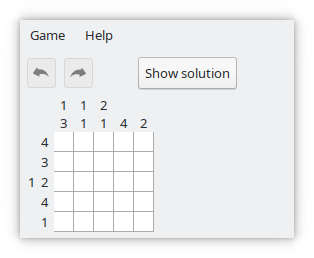
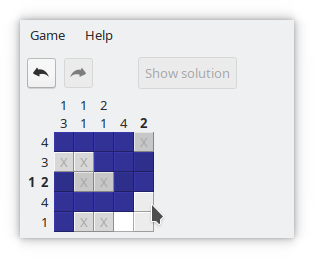
Terminology:
- "solid": The numbers in rows and columns give you a hint about the number of solid fields and their grouping. During game play you mark solid fields in blue.
- "blank": A field that is not solid. Blank fields are between solid groups or at begin or end of a row or column. Blank fields may be marked in grey with an X.
- "undecided": A field that you have not (yet) marked as solid or blank. At game start all fields are undecided in white color.
When you start the game, the game grid is empty, all fields are mark undecided (left image). The target is to mark the solid squares as indicated by the numbers. The numbers tell you how the solid fields are grouped in rows and columns. The numbers are in the same order as the solid groups in the row or column. Between the groups (if there is more than one per row or column) there is at least one blank field.
The right image shows you the solution. The blue fields are marked solid, the groups correspond to the numbers. The remaining fields are either marked as blank or are undecided. The blank marks are not required but help to solve the puzzle.
The game is solved as soon as all solid squares are correctly marked. The other fields may be marked as blank or undecided.
Play modes
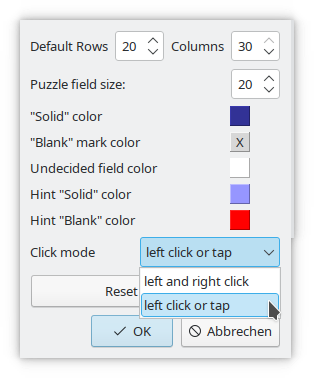
In the settings menu you can define colours and default sizes as well as the click mode.
With click mode "left and right click" a mouse with left and right mouse button (or equivalently emulated actions) is required to play. In mode "left click or tap" you only need to click with your left mouse button or tap on a touch device.
Left and right mouse clicks
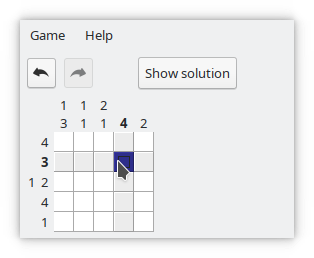
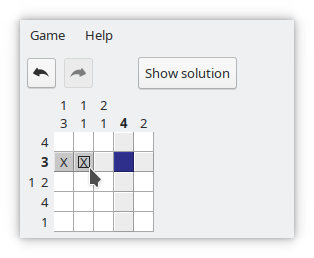
Klick on a square with the left mouse button. If the field is undecided or marked as blank, the field mark is changed to solid (left image). If the square is marked as solid, the solid mark is removed and the field is undecided.
Klick on a square with the right mouse button. If the field is undecided or marked as solid, the field mark is changed to blank (right image). If the square is marked as blank, the blank mark is removed and the field is undecided.
Keep the mouse button pressed and move the mouse to mark more fields.
Left click only or tap
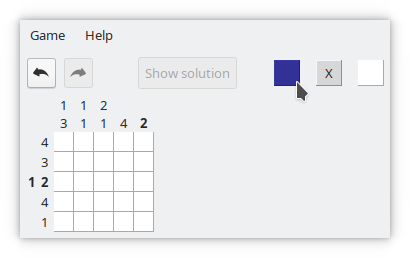
Select the mark mode by clicking/tapping on one of the three mark selector buttons, then click on a square to mark it accordingly.